Thursday, November 17, 2016

Voice Output Communication Device


These devices are also know as AACs.  They are for students with disabilities by being non-verbal and also students that are autistic.  The AAC becomes their voice for them.  You can press buttons and linked to each button is a word or small phrase.  This can ensure that students are able to communicate their wants and needs.  The can be devices or you can use and iPad with an AAC app.  

My daughter has an AAC app on her iPad because she is non-verbal.  The app that she has can have any where from two buttons up to eight.  She struggles with using just the two buttons so she does not need an advanced model yet.  


Assistive Literacy Software


Assistive literacy software helps students develop their literacy skills.  Students who have reading disabilities and dyslexia would benefit from this software.  It can help with phonemic awareness, fluency, decoding and comprehension skills.  

Here is a video that shows how Earobics works.  Earobics is an assistive literacy software program that schools can use.  This was a product that was used in an elementary school where I previously taught.  I have not used it because they used it with the kindergartners and students that were pulled out for special education services.


Portable Word Processor


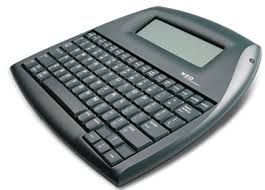
Often called a portable keyboard, a portable word processor can be an alternative to a laptop for writing.  This device is smaller and lighter than a laptop.  You can autosave the work for later so you don't have to worry about finishing the work all at once.  You can even download text from a computer and upload it to the portable word processor.  


This video demonstrates how the AlphaSmart NEO works.  I have never seen or used one a portable word processor. 

Adapted Keyboard


These  adapted keyboards are great for students that struggle with vision.  As you can tell, they display different colors to help find the keys and the letters have large print on the keys to make it easier to find the key they are looking for.  Keys-U-See is a brand that makes adapted keyboards.


I have never seen one of these keyboards in person, but as you can see on the video, the keyboard is very large to help make the keys noticeable.


Multisensory Educational Software

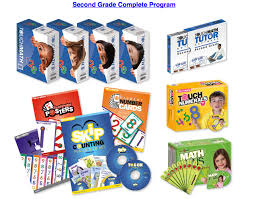
This is software that helps students because it uses more than one sensory.  TouchMath is an example of multisensory.  When using this product, you touch certain points of a number while also using vision to see the numbers.  It uses manipulatives, posters, and classroom aids to help the students learn. 


This video demonstrates how Touch Math is used.  I have not yet used touch math but they do have the materials for students in the school that I teach in.

Books on CD

Books on CD 
Books on CD are great for all students.  They really benefit blind students or students that are struggling to read.  I have used books on cd in my classroom before.  Many of the researched based curriculums also come with CDs to read all of the stories to the students.  


Here is a video of a book read on youTube which is a demonstration of how a book with CD would work.

Scan and Read Software

Scan and Read Software 
This technology is amazing.  This would be for students that struggle with reading or are blind.  You can scan the a page into the computer and the software can read the document to you.  This would be great for text books.  ReadIRIS is a product that can be used.  It is probably used for older students but teachers could scan items for younger students to have books read to them.


This is a tutorial to see how the software works.

I have never heard of this software so this was a great software to learn about.